Transferring Data
Overview
Most data transfer methods support both sending and receiving, so you may initiate the transfer from either Merlin or the other system — depending on network visibility.
- From PSI Network to Merlin: Merlin login nodes are visible from the PSI network, so direct transfers using
rsync, or ftp are generally preferable. Transfers from Merlin7 to PSI may require special firewall rules. - From Merlin to the Internet: Merlin login nodes can access the internet with a limited set of protocols:
- HTTP-based protocols on ports
80or445(e.g., HTTPS, WebDAV). - Other protocols (e.g., SSH, FTP, rsync daemon mode) require admin configuration, may only work with specific hosts, and might need new firewall rules.
- HTTP-based protocols on ports
- From the Internet to PSI: Systems outside PSI can access the PSI Data Transfer Service at
datatransfer.psi.chusing SSH-based protocols or Globus.
Note
SSH-based protocols using port 22 to most PSI servers are generally not permitted.
However, transfers from any PSI host to Merlin7 using port 22 are allowed.
Port 21 is also available for FTP transfers from PSI to Merlin7.
Choosing the best transfer method
| Scenario | Recommended Method | Reason |
|---|---|---|
| Small dataset, Linux/macOS | rsync |
Resume support, skips existing files, works over SSH |
| Quick one-time small transfer | scp |
Simple syntax, no need to install extra tools |
| Large dataset, high speed needed (not sensitive) | FTP via service03.merlin7.psi.ch |
Fastest transfer speed (unencrypted data channel) |
| Large dataset, high speed needed (sensitive data) | FTP via ftp-encrypted.merlin7.psi.ch |
Encrypted control & data channels for security, but slower than service03 |
| Windows interactive GUI transfer | WinSCP | User-friendly interface, PSI Software Kiosk, supports drag-and-drop |
| Cross-platform interactive GUI transfer | FileZilla | User-friendly interface, works on Linux/macOS/Windows, supports drag-and-drop |
| From the internet to PSI | PSI Data Transfer Service | Supports SSH-based protocols and Globus |
| Need for sharing large files | SWITCHfilesender | Supports sharing large file and expiration date |
| PSI -> Merlin7 over FTP | Any FTP-based client | Port 21 allowed from PSI to Merlin7 |
| PSI -> Merlin7 over SSH | Any SSH-based method | Port 22 allowed from PSI to Merlin7 |
The next chapters contain detailed information about the different transfer methods available on Merlin7.
Transferring from within PSI
The following methods transfer data directly via the login nodes. They are suitable for use from within the PSI network.
Secure FTP
A vsftpd service is available on the login nodes, providing high-speed transfers. Choose the server based on your speed vs. encryption needs:
login001.merlin7.psi.ch: Encrypted control & data channels. Use if your data is sensitive. Slower, but secure.service03.merlin7.psi.ch: Encrypted control channel only. Use if your data can be transferred unencrypted. Fastest method.
Tip
The control channel is always encrypted, therefore, authentication is encrypted and secured.
Rsync
Rsync is the preferred method for small datasets from Linux/macOS systems. It supports resuming interrupted transfers and skips already transferred files. Syntax:
An example for transferring local files to a Merlin project directory
Tip
If a transfer is interrupted, just rerun the command: rsync will skip transferring existing files.
Warning
Rsync uses SSH (port 22). For large datasets, transfer speed might be limited.
SCP
SCP works similarly to rsync but does not support resuming interrupted transfers. It may be used for quick one-off transfers. Example:
Transferring data from outside PSI
From August 2024, Merlin is connected to the PSI Data Transfer service,
datatransfer.psi.ch. This is a central service managed by the Linux team. However, any problems or questions related to it can be directly
reported to the Merlin administrators, which will forward the request if necessary.
Access to the PSI Data Transfer services uses Multi factor authentication (MFA). Therefore, having the Microsoft Authenticator App is required as explained here.
The PSI Data Transfer servers supports the following protocols:
* Data Transfer datatransfer.psi.ch via SSH (scp / rsync / FileZilla)
* Notice that datatransfer.psi.ch does not allow SSH login, only rsync, scp are possible.
* Data Transfer - www.globus.org
* Requires authentication with Switch, as well as a second authentication with PSI.
Tip
Please follow the Official PSI Data Transfer documentation for further instructions.
Warning
When using Globus, Multi-Factor Authentication (MFA) works only if push notifications are configured as the only MFA method in the PSI MFA settings.
If any other method is enabled, such as SMS codes or a combination of push notifications and authentication token, Globus may become unusable.
To fix this, go to your Microsoft Account Security Information
and change the sign-in method to App Based Authentication - notification only.
FileZilla: datatransfer.psi.ch
One can simply use the FileZilla to transfer data from/to outside PSI. It's important to setup MFA for the connection. To do this, one has to go to the menu File -> Site Manager and create a new endpoint (new site), as follows:
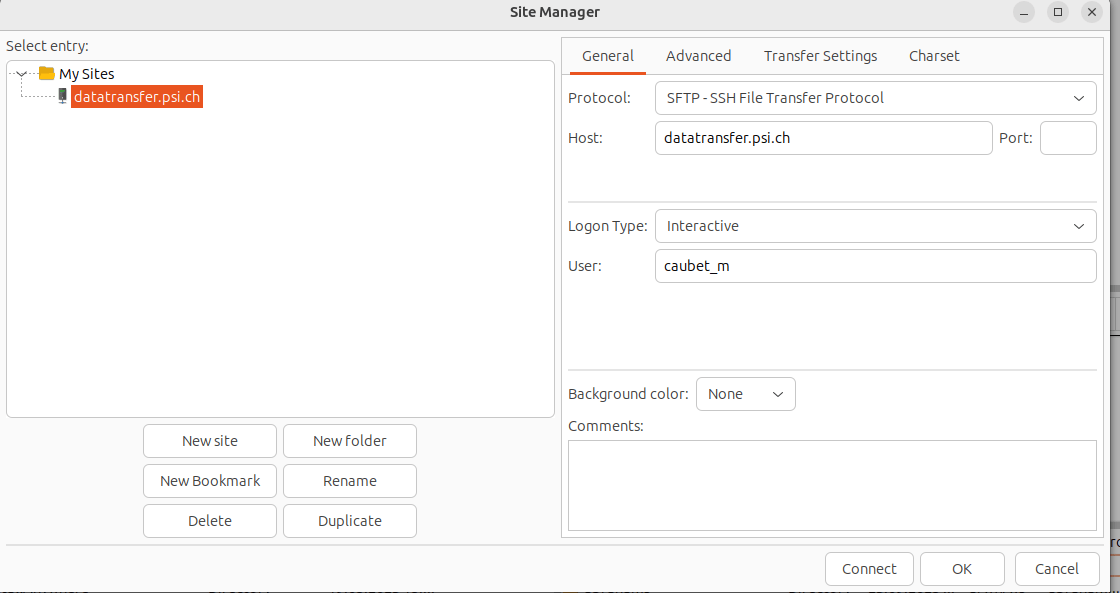
It's important that Logon Type has the interactive option set, and the transfer Protocol is SFTP - SSH File Transfer Protocol.
Connecting to Merlin7 from outside PSI
Merlin7 is fully accessible from within the PSI network. To connect from outside you can use:
- VPN (alternate instructions)
- SSH hopx
- Please avoid transferring big amount data through hop
- No Machine
- Remote Interactive Access through 'nx.psi.ch'
- Please avoid transferring big amount of data through NoMachine
Connecting from Merlin7 to outside file shares
merlin_rmount command
Merlin provides a command for mounting remote file systems, called merlin_rmount. This
provides a helpful wrapper over the Gnome storage utilities, and provides support for a wide range of remote file formats, including
- SMB/CIFS (Windows shared folders)
- WebDav
- AFP
- FTP, SFTP
- others
More instruction on using merlin_rmount
Recommended Data Transfer GUI clients
WinSCP (Windows)
Available in the Software Kiosk on PSI Windows machines.
- Using your PSI credentials, connect to
- when using port 22, connect to
login001.merlin7.psi.chorlogin002.merlin7.psi.ch. - when using port 21, connect to:
ftp-encrypted.merlin7.psi.ch: Fast transfer rates. Both control and data channels encrypted.service03.merlin7.psi.ch: Fastest transfer rates, but data channel not encrypted.
- when using port 22, connect to
-
Drag and drop files between your PC and Merlin.
-
FTP (port 21)
FileZilla (Linux/MacOS/Windows)
Download from FileZilla Project, or install from your Linux software repositories if available.
- Using your PSI credentials, connect to
- when using port 22, connect to
login001.merlin7.psi.chorlogin002.merlin7.psi.ch. - when using port 21, connect to:
ftp-encrypted.merlin7.psi.ch: Fast transfer rates. Both control and data channels encrypted.service03.merlin7.psi.ch: Fastest transfer rates, but data channel not encrypted.
- when using port 22, connect to
- Supports drag-and-drop file transfers.
Sharing Files with SWITCHfilesender
SWITCHfilesender is a Swiss-hosted installation of the FileSender project — a web-based application that allows authenticated users to securely and easily send arbitrarily large files to other users. Features:
- Secure large file transfers: Send files that exceed normal email attachment limits.
- Time-limited availability: Files are automatically deleted after the chosen expiration date or number of downloads.
- Voucher system: Authenticated users can send upload vouchers to external recipients without an account.
- Designed for research & education: Developed to meet the needs of universities and research institutions.
About the authentication:
- It uses SimpleSAMLphp, supporting multiple authentication mechanisms: SAML2, LDAP, RADIUS and more.
- It's fully integrated with PSI's Authentication and Authorization Infrastructure (AAI).
- PSI employees can log in using their PSI account:
- Open SWITCHfilesender.
- Select PSI as the institution.
- Authenticate with your PSI credentials.
The service is designed to send large files for temporary availability, not as a permanent publishing platform. Typical use case:
- Upload a file.
- Share the download link with a recipient.
- File remains available until the specified expiration date is reached, or the download limit is reached.
- The file is automatically deleted after expiration.
Warning
SWITCHfilesender is not a long-term storage or archiving solution.